

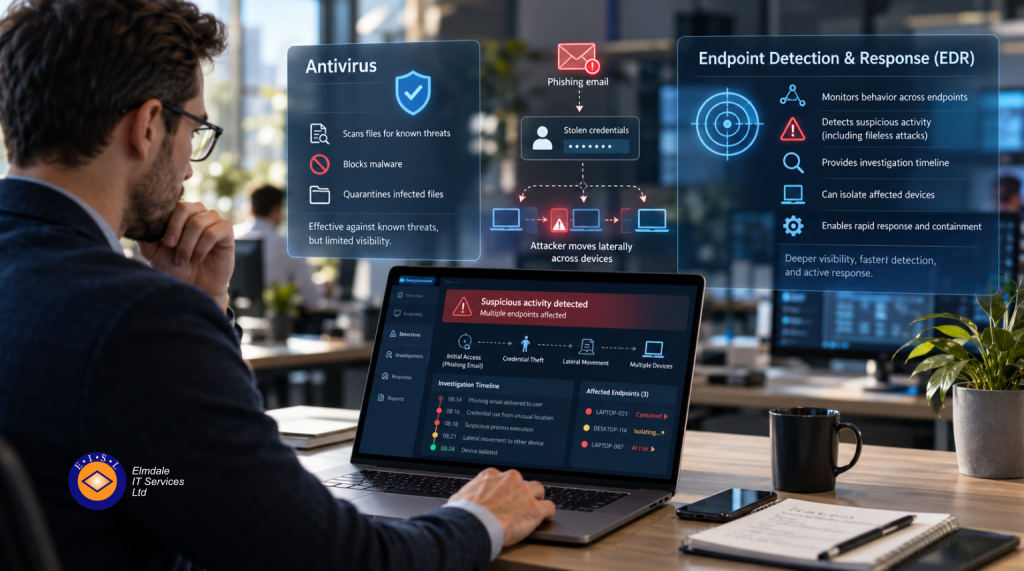
A staff member opens what appears to be a routine invoice, enters their Microsoft 365 password on a convincing sign-in page, and carries on working. Traditional antivirus may find nothing suspicious. The real risk begins when those stolen credentials are used to access email, cloud files or other systems. That is where the endpoint detection vs antivirus conversation becomes a business decision, not simply a software choice.
For organisations with limited in-house IT capacity, the question is not whether security software is needed. It is how quickly a threat can be stopped, how clearly it can be investigated, and who will act when an alert appears. The right answer depends on your systems, your users, the data you hold and the consequences of downtime.
What antivirus is designed to do
Antivirus is the long-established first line of defence for laptops, desktops and servers. It scans files, applications and downloads for known malicious code and suspicious behaviour. When it identifies a threat, it can block, quarantine or remove it before it causes harm.
Modern business antivirus is more capable than the basic products many people remember. It can use cloud-based threat intelligence, behavioural analysis and web protection to recognise threats that do not match an old-fashioned virus signature. Used properly, it remains an essential part of endpoint security.
Its main strength is prevention. Antivirus is designed to stop common malware, malicious downloads and known ransomware before they run. It is generally straightforward to deploy, less costly than more advanced platforms and appropriate for organisations that need dependable baseline protection across a managed estate.
However, antivirus is not intended to explain every suspicious event on a device. If an attacker uses legitimate tools, steals a password, or changes settings gradually to avoid detection, there may be little for a conventional antivirus product to block. It may also provide limited context about what happened before and after an alert.
What endpoint detection and response adds
Endpoint detection and response, usually shortened to EDR, monitors activity across devices in greater detail. Rather than concentrating only on whether a file is malicious, it looks for patterns that suggest an attacker is active.
For example, EDR can record unusual sign-in activity, unexpected PowerShell commands, attempts to disable security controls, rapid file encryption or a programme trying to move between devices. It brings this information together so an IT team or security provider can investigate the sequence of events.
The response element matters just as much as detection. Depending on the service and configuration, an affected device can be isolated from the network while still allowing investigation. Security teams can stop harmful processes, remove persistence mechanisms, collect evidence and check whether the same indicators appear elsewhere.
This makes EDR particularly valuable where a delayed response would have serious operational consequences. A school protecting safeguarding information, a professional services firm handling client records, or a business relying on shared systems to trade cannot assume every attack will arrive as an easily recognised virus.
EDR is a capability, not a guarantee
EDR produces more visibility, but visibility has to be acted upon. A platform can generate alerts for unusual behaviour that is harmless, as well as for genuine threats. Without someone reviewing and investigating those alerts, a business may have more information but no meaningful improvement in protection.
That is why many organisations combine EDR with managed detection and response, often called MDR. In this arrangement, security specialists monitor alerts, validate potential incidents and take agreed action. It can be a practical route for organisations that need stronger defences but do not have a dedicated security operations team.
Endpoint detection vs antivirus: the practical differences
Antivirus and EDR overlap, and many modern EDR products include antivirus-style prevention. They should not automatically be viewed as competing products. In many cases, EDR builds on the preventative controls traditionally associated with antivirus and adds investigation and containment tools.
The clearest distinction is the question each technology answers. Antivirus asks, “Can this known or suspicious item be stopped?” EDR also asks, “What is happening on this device, is it part of a wider attack, and what should we do next?”
Antivirus may be sufficient for a small, low-risk environment with well-managed devices, reliable backups, multi-factor authentication and straightforward security requirements. It is also a sensible starting point when a business has no centrally managed protection at all.
EDR is more appropriate when the organisation has valuable or sensitive data, remote and hybrid staff, multiple locations, compliance obligations, a history of phishing attempts, or a low tolerance for disruption. These factors increase the likelihood that an attacker could use methods that sit outside traditional malware detection.
Cost is a real consideration. EDR licensing and monitoring can cost more than basic antivirus, and it needs careful deployment to avoid gaps. Yet the comparison should include the potential cost of an incident: lost working time, recovery effort, reputational damage, regulatory exposure and the disruption caused by unavailable systems. A cheaper product is not necessarily lower cost over time.
Choosing the right level of protection
A useful starting point is to assess risk rather than buy the most heavily marketed product. Consider where your data is stored, which devices can access it, whether staff work away from the office, and how quickly systems would need to be restored after an incident.
Also consider who is responsible for security alerts. If alerts are received by an office manager, director or busy internal IT generalist, they may not be reviewed quickly enough to contain an active attack. EDR without a clear response process can create a false sense of reassurance.
Your wider security controls matter too. Endpoint protection works best alongside multi-factor authentication, regular patching, secure email filtering, tested backups, sensible user permissions and staff awareness training. Attackers usually look for the easiest route in. Closing several common gaps is more effective than relying on one product to solve every problem.
For organisations working towards Cyber Essentials, centrally managed endpoint protection and consistent patching are particularly relevant. The precise tools may vary, but the goal is the same: reduce avoidable risk and be able to demonstrate that sensible controls are in place.
Questions worth asking a provider
Before choosing a platform or managed service, ask what protection is included by default and what requires additional licensing. Establish whether the service covers antivirus prevention, EDR monitoring, out-of-hours response and device isolation.
It is equally useful to ask how incidents are communicated. Will you receive a technical alert with no explanation, or a clear account of the risk, action taken and any decision required from your organisation? Good security support should make a difficult situation easier to manage, not add uncertainty.
Finally, confirm how the service fits with your existing Microsoft 365 setup, servers, remote workers and backup arrangements. Security tools are most effective when they are deployed consistently and managed as part of an overall IT plan.
Protection needs a response plan
There is no single answer to endpoint detection vs antivirus because every organisation carries a different level of risk. Antivirus provides vital preventative protection and should not be dismissed. EDR adds the visibility and response capability needed to deal with more sophisticated or less obvious attacks.
For many established organisations, the best approach is managed endpoint protection that combines prevention, detection and a defined human response. Elmdale IT Services can help assess the risks around your devices, users and data in plain English, then recommend protection that fits how your organisation actually works.
The most valuable security decision is not the one with the longest feature list. It is the one that gives your people a clear route to support when something unusual happens, before a small warning becomes a major interruption.